Availability
Debugging
vConsole
On a real device, if you want to view the log content and additional debugging information output by the console API, click the button in the upper right corner of the screen to open the menu and select Open Debug. The applet will exit. When reopened, a vConsole button will appear in the lower right corner. Click the vConsole button to open the log panel.
The vConsole display of the applet is as follows:
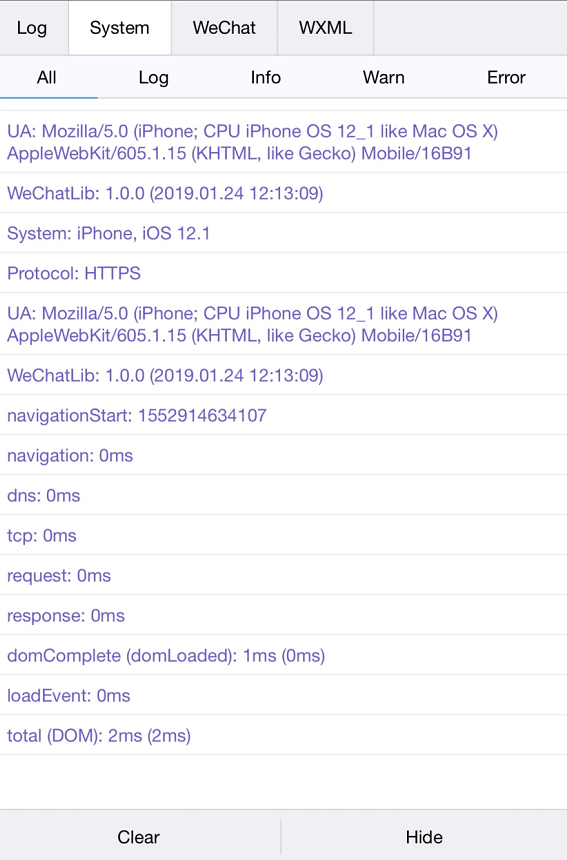
vConsole Description
Due to the limitations of the implementation mechanism, the log content printed by the developer calling the console API is converted into a JSON string and transmitted to the vConsole, resulting in some limitations on the content displayed in the vConsole:
- Except for Number, String, Boolean, and null, other types will be processed and displayed as Objects, and the Enumerable properties in the object and prototype chain will be printed.
- Infinity and NaN will be displayed as null.
- Undefined, ArrayBuffer, and Function types cannot be displayed.
- Objects with circular references cannot be printed.
const a = {};
a.b = a;
console.log(a);
In response to the above problems, the applet has made some processing when using vConsole:
const circular = { x: {}, c: {} };
circular.x = [{ promise: Promise.resolve() }];
circular.a = circular;
circular.c.x0 = circular.x[0];

console.log(circular);
// "{a: '<Circular: @>', c: {x0: '<Circular: @.x[0]>'}, x: [{promise: '<Promise>'}]}"
TIP
Try to avoid printing logs with complex structures or long contents in non-debugging scenarios, which may cause extra time consumption.
Operating environment
Mini program running environment
Mini programs run on three terminals: iOS (iPhone/iPad), Android, and developer tools for debugging.
The script execution environment of the three terminals and the environment for rendering non-native components are different:
- On iOS, the javascript code of the mini program logic layer runs in JavaScriptCore, and the view layer is rendered by WKWebView. The environments are iOS8, iOS9, and iOS10.
- On Android, the javascript code of the mini program logic layer runs in X5 JSCore, and the view layer is implemented based on the Mobile Chrome 97 kernel. Same-layer rendering Function.
- On the development tool, the javascript code of the mini program logic layer runs in NW.js , and the view layer is rendered by Chromium 60 Webview.
Running restrictions
For security reasons, dynamic execution of JS code is not supported in mini programs, that is:
JS code execution using eval is not supported.
It does not support creating functions using new Function.
Platform differences
Although the environments of the three terminals are very similar, there are still some differences:

 - Inconsistent JavaScript syntax and API support: In terms of syntax, developers can circumvent this by turning on the ES6 to ES5 function; in addition, the Mini Program basic library has built-in necessary Polyfills to make up for the API differences.

 - Inconsistent WXSS rendering performance: Although most problems can be avoided by turning on style completion, it is recommended that developers check the actual performance of the Mini Program on iOS and Android respectively.
TIP
Developer tools are only for debugging, and the final performance is subject to the client.
Client ES6 API support
TIP
In the following table, √ means support, and × means that the item is not supported.
| String | iOS 8 | iOS9 | iOS10 | Android |
|---|---|---|---|---|
| codePointAt | √ | √ | √ | √ |
| normalize | × | × | √ | √ |
| includes | √ | √ | √ | √ |
| startsWith | √ | √ | √ | √ |
| endsWith | √ | √ | √ | √ |
| repeat | √ | √ | √ | √ |
| String.fromCodePoint | √ | √ | √ | √ |
| Array | iOS 8 | iOS9 | iOS10 | Android |
|---|---|---|---|---|
| copyWithin | √ | √ | √ | √ |
| find | √ | √ | √ | √ |
| findIndex | √ | √ | √ | √ |
| fill | √ | √ | √ | √ |
| entries | √ | √ | √ | √ |
| keys | √ | √ | √ | √ |
| values | X | √ | √ | X |
| includes | X | √ | √ | √ |
| Array.from | √ | √ | √ | √ |
| Array.of | √ | √ | √ | √ |
| Number | iOS 8 | iOS9 | iOS10 | Android |
|---|---|---|---|---|
| isFinite | √ | √ | √ | √ |
| isNaN | √ | √ | √ | √ |
| parseInt | √ | √ | √ | √ |
| parseFloat | √ | √ | √ | √ |
| isInteger | √ | √ | √ | √ |
| EPSILON | √ | √ | √ | √ |
| isSafeInteger | √ | √ | √ | √ |
| Math | iOS 8 | iOS9 | iOS10 | Android |
|---|---|---|---|---|
| trunc | √ | √ | √ | √ |
| sign | √ | √ | √ | √ |
| cbrt | √ | √ | √ | √ |
| clz32 | √ | √ | √ | √ |
| imul | √ | √ | √ | √ |
| fround | √ | √ | √ | √ |
| hypot | √ | √ | √ | √ |
| expm1 | √ | √ | √ | √ |
| log1p | √ | √ | √ | √ |
| log10 | √ | √ | √ | √ |
| log2 | √ | √ | √ | √ |
| sinh | √ | √ | √ | √ |
| cosh | √ | √ | √ | √ |
| tanh | √ | √ | √ | √ |
| asinh | √ | √ | √ | √ |
| acosh | √ | √ | √ | √ |
| atanh | √ | √ | √ | √ |
| Object | iOS 8 | iOS9 | iOS10 | Android |
|---|---|---|---|---|
| is | √ | √ | √ | √ |
| getOwnPropertyDescriptor | √ | √ | √ | √ |
| keys | √ | √ | √ | √ |
| getOwnPropertyNames | √ | √ | √ | √ |
| getOwnPropertySymbols | √ | √ | √ | √ |
| Other | iOS 8 | iOS9 | iOS10 | Android |
|---|---|---|---|---|
| Symbol | √ | √ | √ | √ |
| Set | √ | √ | √ | √ |
| Map | √ | √ | √ | √ |
| Proxy | × | × | √ | X |
| Reflect | √ | √ | √ | √ |
| Promise | √ | √ | √ | √ |
Operation Mechanism
There are two situations when starting a mini program, one is cold start and the other is hot start. If the user has opened a mini program and then opens it again within a certain period of time, there is no need to restart it. Just switch the background mini program to the foreground. This process is called hot start. Cold start refers to the situation when the user opens the mini program for the first time or opens it again after the mini program is actively destroyed by the host App. At this time, the mini program needs to be reloaded and started.
Update Mechanism
If a new version is found during the cold start of the mini program, the code package of the new version will be downloaded asynchronously and started with the local package of the client at the same time, that is, the new version of the mini program will not be applied until the next cold start. If the latest version needs to be applied immediately, you can use wx.getUpdateManager API to handle it.
Running mechanism
There is no concept of restarting the mini program.
When the mini program enters the background, the client will maintain the running state for a period of time. After a certain period of time (currently 5 minutes), it will be actively destroyed by the container.
On iOS, when the client receives two or more system memory alarms in a certain time interval (currently 5 seconds), it will actively destroy the mini program and prompt the user.